> ## Documentation Index
> Fetch the complete documentation index at: https://docs.time2.bike/llms.txt
> Use this file to discover all available pages before exploring further.
# Checkout & confirmation
> Paying for your registration and what happens after.
The final step of registration is **Review & Pay**. This is where the
order is finalized.
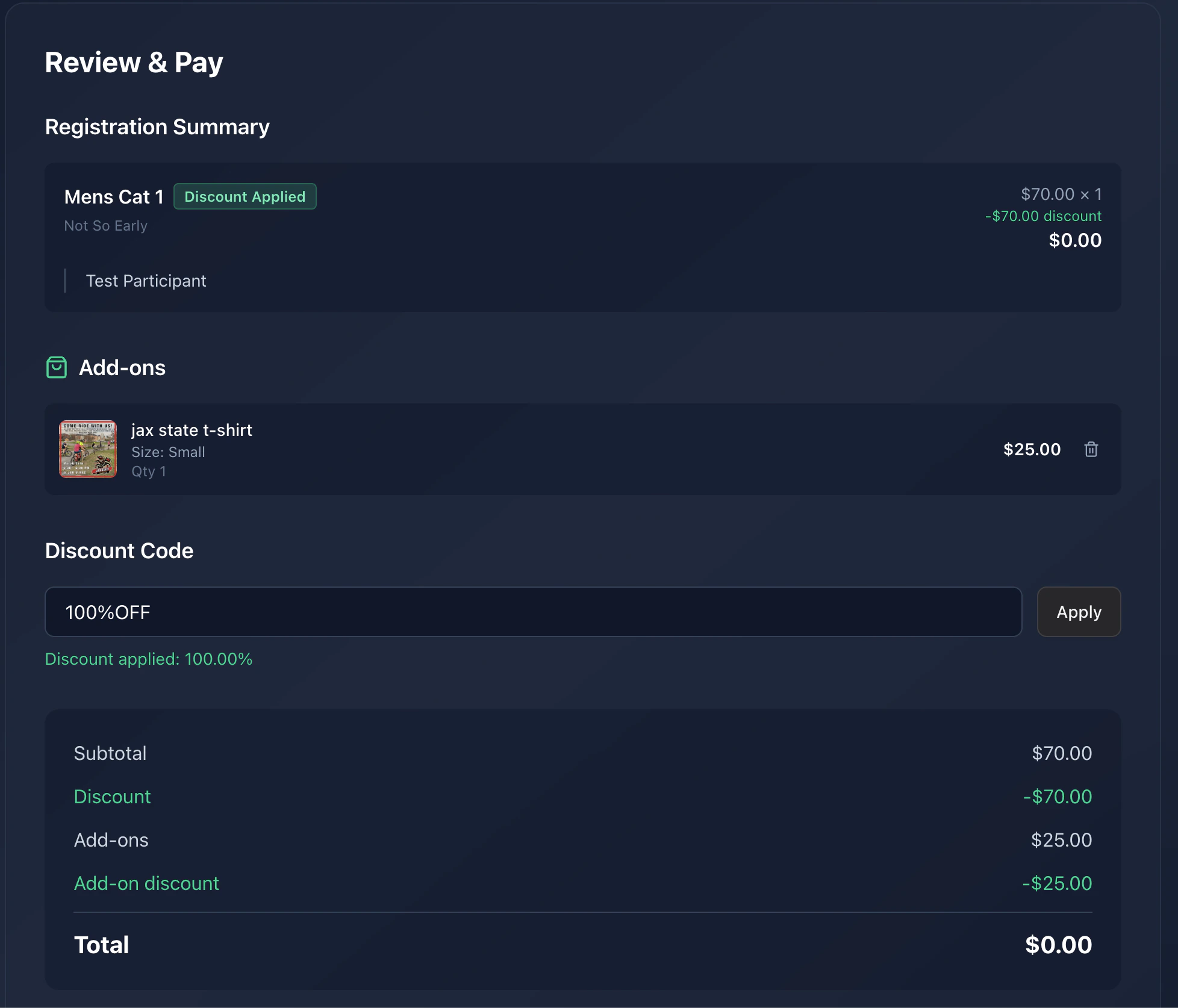 ## What's on the review screen
* **Per-race line items**: race name, participant, price.
* **Add-ons / merch**: any extras you picked.
* **Discount**: if you applied a code, the discount line shows next to
each affected race.
* **Service fee**: Time2Bike's platform fee.
* **Total**: what your card will be charged.
Double-check the participant names — that's what shows on the start list
and on results.
## Paying
You'll be redirected to **Stripe Checkout** to enter (or pick) a
payment method.
Stripe handles the card, Apple Pay, Google Pay, and any other methods
the organizer has enabled. Time2Bike never sees your card number.
After successful payment, you're sent to
`/events/[slug]/finish/[checkoutId]/registration-success`.
## Confirmation email
Time2Bike emails a receipt and confirmation to the email on your
account. It includes:
* Event name, date, and venue
* Each race you registered for, with your participant name
* The total you paid
* A link back to the event page
## Holds & invites
If you invited other riders during registration, their spots are held
until they claim their invite. They get their own email with a "Finish
your registration" link.
You can see the status of your registration (including any pending
invites) on the event's [Who's registered](/riders/registering/start-list)
page and on your account.
## Something went wrong?
* **Stripe declined the card** — try a different method, or contact your
bank.
* **Page hung after Stripe** — check your email. If the receipt arrived,
you're registered. Otherwise, contact the organizer with your
participant name; they can confirm and resend the link.
* **Wrong participant** — contact the organizer to swap before race day.
## Next
Check the start list to confirm your name is there.
## What's on the review screen
* **Per-race line items**: race name, participant, price.
* **Add-ons / merch**: any extras you picked.
* **Discount**: if you applied a code, the discount line shows next to
each affected race.
* **Service fee**: Time2Bike's platform fee.
* **Total**: what your card will be charged.
Double-check the participant names — that's what shows on the start list
and on results.
## Paying
You'll be redirected to **Stripe Checkout** to enter (or pick) a
payment method.
Stripe handles the card, Apple Pay, Google Pay, and any other methods
the organizer has enabled. Time2Bike never sees your card number.
After successful payment, you're sent to
`/events/[slug]/finish/[checkoutId]/registration-success`.
## Confirmation email
Time2Bike emails a receipt and confirmation to the email on your
account. It includes:
* Event name, date, and venue
* Each race you registered for, with your participant name
* The total you paid
* A link back to the event page
## Holds & invites
If you invited other riders during registration, their spots are held
until they claim their invite. They get their own email with a "Finish
your registration" link.
You can see the status of your registration (including any pending
invites) on the event's [Who's registered](/riders/registering/start-list)
page and on your account.
## Something went wrong?
* **Stripe declined the card** — try a different method, or contact your
bank.
* **Page hung after Stripe** — check your email. If the receipt arrived,
you're registered. Otherwise, contact the organizer with your
participant name; they can confirm and resend the link.
* **Wrong participant** — contact the organizer to swap before race day.
## Next
Check the start list to confirm your name is there.