> ## Documentation Index
> Fetch the complete documentation index at: https://docs.time2.bike/llms.txt
> Use this file to discover all available pages before exploring further.
# Coupons & pricing
> How race pricing works on Time2Bike, including price tiers and discount codes.
## How a race is priced
Each race on Time2Bike has a **price schedule** — a list of dated price
tiers. Common patterns:
* **Early bird** — \$40 until 30 days before the race
* **Regular** — \$55 from then until 2 days before
* **Race week** — \$70 until registration closes
The price shown on the event page is **the tier in effect right now**,
not the cheapest one. When you check out, that's what you pay.
If the organizer changes the schedule mid-window, anyone who has already
paid keeps their old price. New registrations pay the current tier.
## Team races
For a **team race**, the price is **per team**, not per teammate. The
total you see on the event page is what the team pays once — split it
however you like with your teammates.
## Service fee
Time2Bike adds a small service fee on top of the race price, shown as a
separate line item on the Review step. The exact fee depends on the
organizer's plan.
## Discount codes
Organizers can issue **discount codes** that you enter at the Review
step.
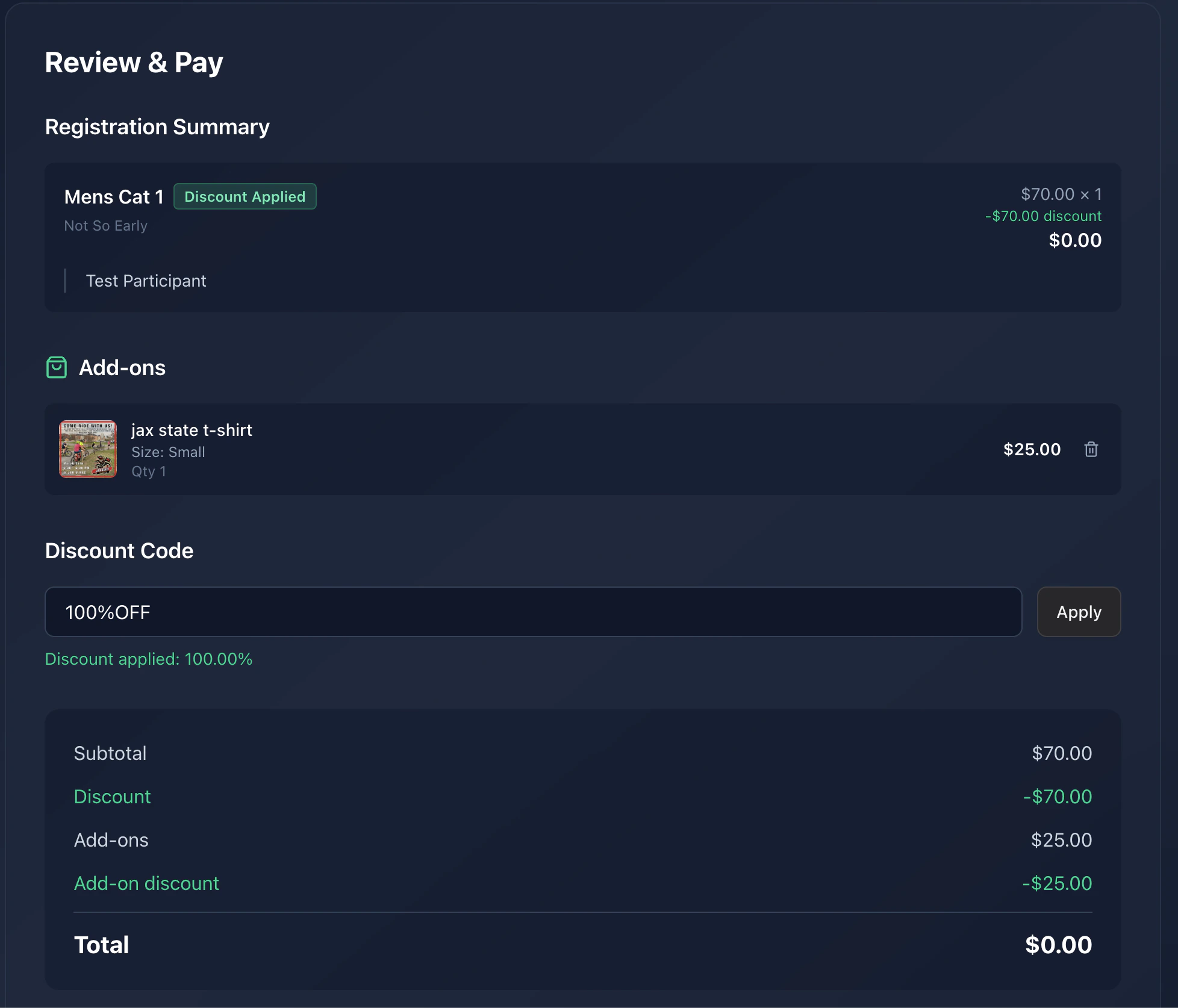 Codes are case-insensitive. Enter it in the **Discount code** box and
click **Apply**.
If the code is valid, you'll see the discount applied per eligible
race. If not, you'll see "Invalid discount code".
A discount can apply to:
* **Any event** — works on every race in your cart
* **A specific event** — works on races for that event only
* **A specific race** — works on that one race
* **A specific series** — works on any race that's part of that series
A single code can be set to apply to **race entries**, **merch & add-ons**, or **both** — so the same code might cover your entry fee, your jersey, or both, depending on how the organizer configured it.
If a code applies to only some of your races, you'll see it discount
those lines and skip the rest. The total updates automatically.
### Why a code might fail
* It's mistyped.
* The code has expired or hit its usage limit.
* It applies to a different event, race, or series than you're
registering for.
* The organizer revoked it.
If you got a code from a sponsor or a series partner and it isn't
working, contact the organizer.
## Refunds & changes
Refund policy is set per-organizer. See
[Editing & refunds](/riders/race-day/rider-profile) on your profile, or
contact the organizer from the event page.
Codes are case-insensitive. Enter it in the **Discount code** box and
click **Apply**.
If the code is valid, you'll see the discount applied per eligible
race. If not, you'll see "Invalid discount code".
A discount can apply to:
* **Any event** — works on every race in your cart
* **A specific event** — works on races for that event only
* **A specific race** — works on that one race
* **A specific series** — works on any race that's part of that series
A single code can be set to apply to **race entries**, **merch & add-ons**, or **both** — so the same code might cover your entry fee, your jersey, or both, depending on how the organizer configured it.
If a code applies to only some of your races, you'll see it discount
those lines and skip the rest. The total updates automatically.
### Why a code might fail
* It's mistyped.
* The code has expired or hit its usage limit.
* It applies to a different event, race, or series than you're
registering for.
* The organizer revoked it.
If you got a code from a sponsor or a series partner and it isn't
working, contact the organizer.
## Refunds & changes
Refund policy is set per-organizer. See
[Editing & refunds](/riders/race-day/rider-profile) on your profile, or
contact the organizer from the event page.