> ## Documentation Index
> Fetch the complete documentation index at: https://docs.time2.bike/llms.txt
> Use this file to discover all available pages before exploring further.
# Dual slalom
> Two lanes, head to head, one button per volunteer.
Dual slalom and 4X need both lanes timed independently and accurately. Your
finish-line volunteers get exactly one button, because they're watching a rider
come down a hill at speed rather than reading a screen.
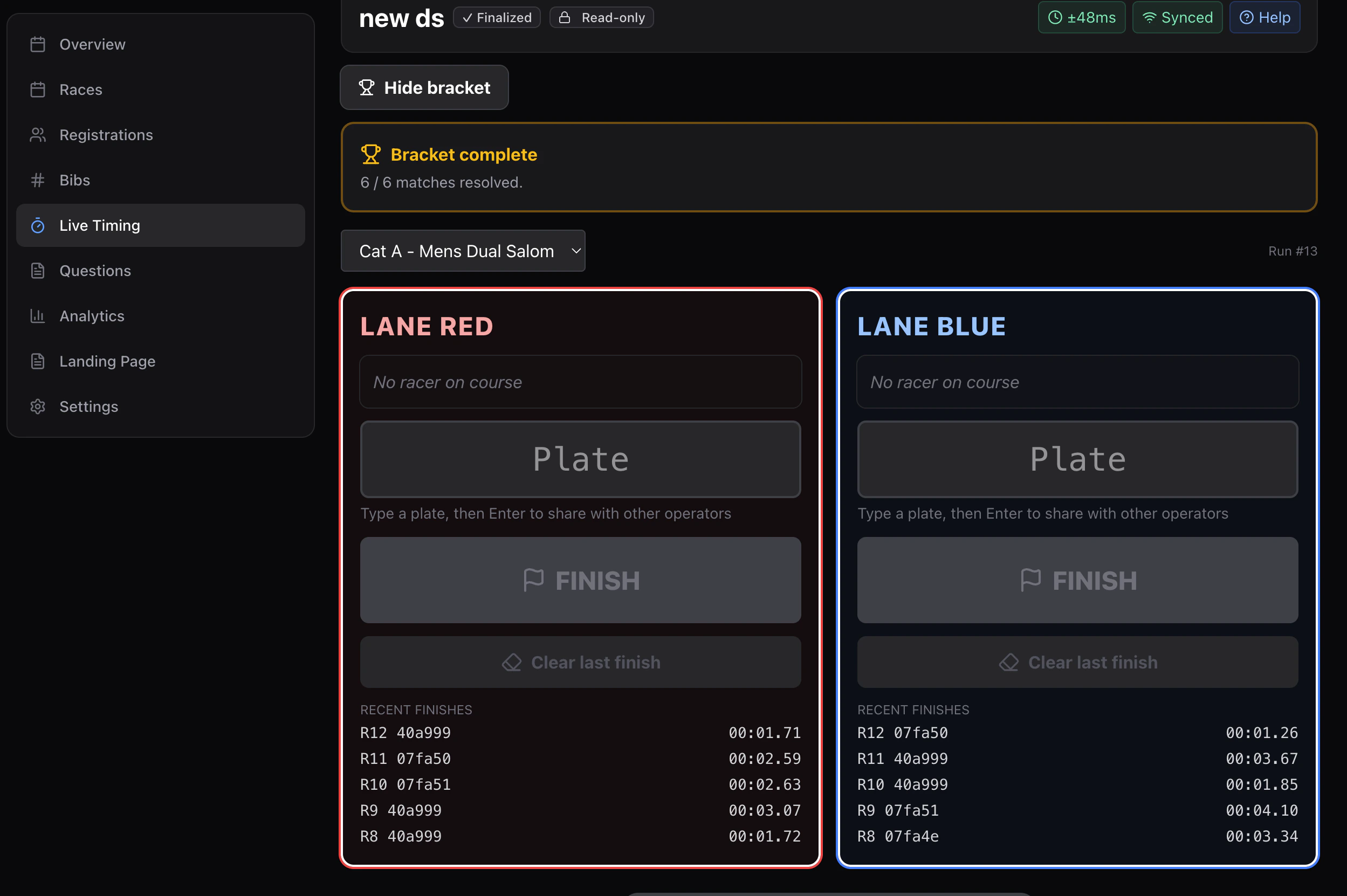 A race gets this screen automatically when its format is set to **dual slalom
bracket** on the [Races](/organizers/races/races-list) page. Nothing to switch on
in timing.
Running a whole slalom event — qualifying several categories together, seeding
the brackets, publishing? Start with
[Running a dual slalom event](/timing/formats/dual-slalom-event). This page is
the operator screen itself.
## One device per job
| Device | Where it stands | What that person does |
| ------------------------ | ----------------------- | ------------------------------------------------ |
| **Starter** | Top of the course | Stages both riders, presses **Start both lanes** |
| **Finisher — red** | Bottom of the red lane | Presses **Finish red** as their rider crosses |
| **Finisher — blue** | Bottom of the blue lane | Presses **Finish blue** |
| **Marshal** *(optional)* | Anywhere | Corrections, DNFs, disqualifications |
Three devices is normal, four if you want a marshal.
## A run, start to finish
The starter types each rider's plate into the red and blue slots. When a
bracket is running, this is filled in already.
One press opens the clock for both riders.
Once both lanes are in, the run is complete and the next pair can stage.
## Pressed too early?
**Clear last finish** on that lane. It removes the bad time cleanly and the lane
goes live again.
Always use Clear rather than trying to re-finish over the top of a wrong time.
## Lane swapping
In a bracket, riders swap lanes between legs — rider A starts red on the first
leg and blue on the second — so both riders run both courses. The screen handles
which lane each rider is in; you just stage and start.
## With an RFID pad
If you're running RFID, the reads turn themselves into lane finishes: while a run
is in flight, a read for a plate that started in the red lane records a red-lane
finish. Reads for plates that aren't currently on course are ignored.
A **Listening for plates** panel shows exactly which two bibs the watcher is
waiting for, so you can see at a glance whether it's going to work.
→ [RFID](/timing/hardware/rfid)
## Settings worth getting right
Under **Timer setup → How I am timing**:
| Setting | For slalom |
| ----------------------- | --------------------------------------------------------------- |
| **Displayed precision** | Hundredths — slalom margins are smaller than a second |
| **Pause behaviour** | Freeze the clock, so a course hold doesn't count against anyone |
Set the pause behaviour before you record anything; it locks once the first entry
lands.
## Running a full bracket
Seeding, rounds, and a final all happen on this screen.
→ [Brackets](/timing/formats/brackets)
A race gets this screen automatically when its format is set to **dual slalom
bracket** on the [Races](/organizers/races/races-list) page. Nothing to switch on
in timing.
Running a whole slalom event — qualifying several categories together, seeding
the brackets, publishing? Start with
[Running a dual slalom event](/timing/formats/dual-slalom-event). This page is
the operator screen itself.
## One device per job
| Device | Where it stands | What that person does |
| ------------------------ | ----------------------- | ------------------------------------------------ |
| **Starter** | Top of the course | Stages both riders, presses **Start both lanes** |
| **Finisher — red** | Bottom of the red lane | Presses **Finish red** as their rider crosses |
| **Finisher — blue** | Bottom of the blue lane | Presses **Finish blue** |
| **Marshal** *(optional)* | Anywhere | Corrections, DNFs, disqualifications |
Three devices is normal, four if you want a marshal.
## A run, start to finish
The starter types each rider's plate into the red and blue slots. When a
bracket is running, this is filled in already.
One press opens the clock for both riders.
Once both lanes are in, the run is complete and the next pair can stage.
## Pressed too early?
**Clear last finish** on that lane. It removes the bad time cleanly and the lane
goes live again.
Always use Clear rather than trying to re-finish over the top of a wrong time.
## Lane swapping
In a bracket, riders swap lanes between legs — rider A starts red on the first
leg and blue on the second — so both riders run both courses. The screen handles
which lane each rider is in; you just stage and start.
## With an RFID pad
If you're running RFID, the reads turn themselves into lane finishes: while a run
is in flight, a read for a plate that started in the red lane records a red-lane
finish. Reads for plates that aren't currently on course are ignored.
A **Listening for plates** panel shows exactly which two bibs the watcher is
waiting for, so you can see at a glance whether it's going to work.
→ [RFID](/timing/hardware/rfid)
## Settings worth getting right
Under **Timer setup → How I am timing**:
| Setting | For slalom |
| ----------------------- | --------------------------------------------------------------- |
| **Displayed precision** | Hundredths — slalom margins are smaller than a second |
| **Pause behaviour** | Freeze the clock, so a course hold doesn't count against anyone |
Set the pause behaviour before you record anything; it locks once the first entry
lands.
## Running a full bracket
Seeding, rounds, and a final all happen on this screen.
→ [Brackets](/timing/formats/brackets)