> ## Documentation Index
> Fetch the complete documentation index at: https://docs.time2.bike/llms.txt
> Use this file to discover all available pages before exploring further.
# Mass start
> Everyone off at once — road, XC, gravel, cyclocross, criterium.
The default screen, and the one you'll use for most racing. A race gets it when
its format is mass start or anything that isn't an interval start, dual slalom,
or relay.
 ## Running one
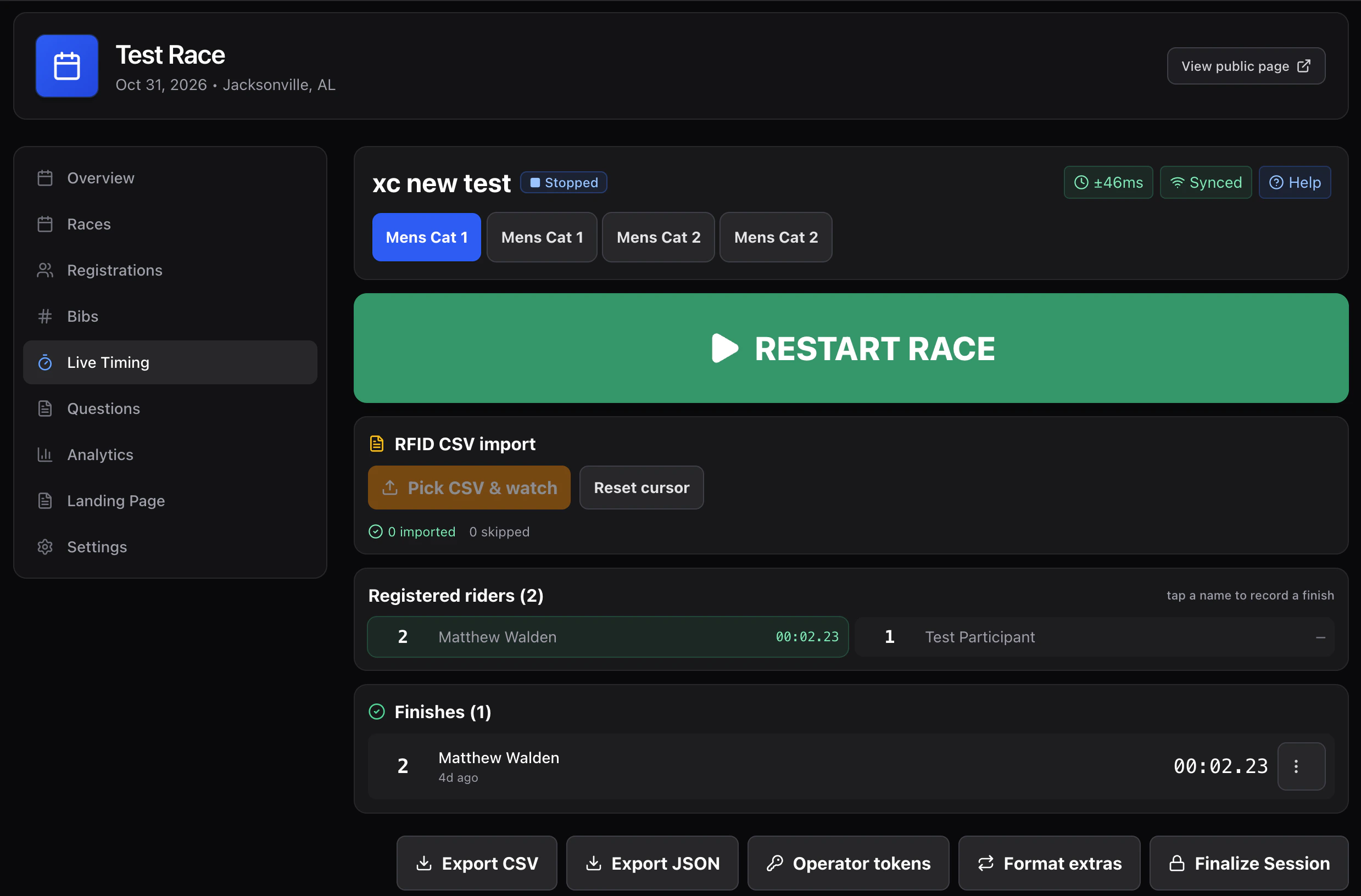
The highlighted tab is where your entries go. Check it every time.
The label under the button confirms what's about to happen — *all 47 riders
go on course*.
Missed the gun? Record finishes anyway — they'll sit as "awaiting start".
Then use **Set the start time** and type when the race actually went, and
every time works itself out from there.
Bib, Enter, bib, Enter — as fast as riders come in. The clock never waits
for you.
Can't read a number? Tap the rider in **Registered riders** instead.
Everything is still editable afterwards.
## Speed at the line
Things that matter when riders arrive three abreast:
* **The input keeps focus.** Never click before typing.
* **Match chips.** Partial numbers surface matching riders — tap instead of
finishing the number.
* **The digit pad.** Big touch targets for gloves and rain.
* **UNDO.** One tap reverses your last entry. Use it the moment you notice,
rather than hunting for the row.
With a big field, put two people on it. Both type into the same race and the
entries merge. If you both catch the same rider it's flagged, not silently
discarded — you pick which time is right afterwards.
## Riders who don't finish
At the end, **On course** is your list of riders still unaccounted for. Work down
it and mark each one DNF or DNS before you finalize, or they'll sit in the
results with no explanation.
## Pausing
* **Freeze clock** — elapsed time stops for everyone. Use it for a real course
hold or a red flag.
* **Pause entries** — the clock keeps running, recording is just held.
Which one you get depends on a timer-wide setting under **More actions →
Timer setup → How I am timing**. It's locked once the first entry is recorded,
so decide before you start.
## Related setups
| If your race also… | See |
| ------------------------------- | --------------------------------------------------- |
| Has a mid-course timing point | [Recording points](/timing/screen/recording-points) |
| Starts in groups | [Waves](/timing/screen/waves) |
| Counts laps or has primes | [Laps & primes](/timing/formats/laps-and-primes) |
| Shares a chute with other races | [Combined finish](/timing/formats/combined-finish) |
| Doesn't mass-start at all | [Interval starts](/timing/formats/interval-starts) |
## Next
Fixing wrong bibs, missed finishes, and duplicates.
## Running one
The highlighted tab is where your entries go. Check it every time.
The label under the button confirms what's about to happen — *all 47 riders
go on course*.
Missed the gun? Record finishes anyway — they'll sit as "awaiting start".
Then use **Set the start time** and type when the race actually went, and
every time works itself out from there.
Bib, Enter, bib, Enter — as fast as riders come in. The clock never waits
for you.
Can't read a number? Tap the rider in **Registered riders** instead.
Everything is still editable afterwards.
## Speed at the line
Things that matter when riders arrive three abreast:
* **The input keeps focus.** Never click before typing.
* **Match chips.** Partial numbers surface matching riders — tap instead of
finishing the number.
* **The digit pad.** Big touch targets for gloves and rain.
* **UNDO.** One tap reverses your last entry. Use it the moment you notice,
rather than hunting for the row.
With a big field, put two people on it. Both type into the same race and the
entries merge. If you both catch the same rider it's flagged, not silently
discarded — you pick which time is right afterwards.
## Riders who don't finish
At the end, **On course** is your list of riders still unaccounted for. Work down
it and mark each one DNF or DNS before you finalize, or they'll sit in the
results with no explanation.
## Pausing
* **Freeze clock** — elapsed time stops for everyone. Use it for a real course
hold or a red flag.
* **Pause entries** — the clock keeps running, recording is just held.
Which one you get depends on a timer-wide setting under **More actions →
Timer setup → How I am timing**. It's locked once the first entry is recorded,
so decide before you start.
## Related setups
| If your race also… | See |
| ------------------------------- | --------------------------------------------------- |
| Has a mid-course timing point | [Recording points](/timing/screen/recording-points) |
| Starts in groups | [Waves](/timing/screen/waves) |
| Counts laps or has primes | [Laps & primes](/timing/formats/laps-and-primes) |
| Shares a chute with other races | [Combined finish](/timing/formats/combined-finish) |
| Doesn't mass-start at all | [Interval starts](/timing/formats/interval-starts) |
## Next
Fixing wrong bibs, missed finishes, and duplicates.