> ## Documentation Index
> Fetch the complete documentation index at: https://docs.time2.bike/llms.txt
> Use this file to discover all available pages before exploring further.
# How times stay accurate
> Why the times are right even with four phones, bad signal, and a late start button.
You don't need to read this page to run a race. It's here for when someone asks
"how do I know these times are right?" — a rider protesting a result, or a
sanctioning body asking how you time.
## The short version
Every time you press a button, Time2Bike records **the exact moment you pressed
it**, not "how long since the race started". Everything else — elapsed times,
places, gaps — is worked out from those moments afterwards.
That one decision is what makes the rest work.
## What it buys you
If nobody pressed **Start** until two minutes in, the finishes are still
correct — they're real moments in time. Press Start whenever you get to it,
and every elapsed time recalculates from the actual start.
This is also why you can record finishes before pressing Start at all.
Each phone quietly checks itself against Time2Bike's clock every few seconds
and corrects for the difference. So a finish recorded on the phone at the
line and a finish recorded on the phone at the feed zone are directly
comparable, even if the two phones' own clocks disagree.
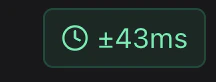
The screen shows how confident it is as a small `± milliseconds` figure. On
a normal race-day connection this is small enough for head-to-head racing.
A phone that spent an hour with no signal isn't guessing when it reconnects.
Every finish it holds is stamped with a real moment, so it slots into the
right place in the results — not the end of the list.
Each entry carries its own identifier. If a phone with bad signal sends the
same finish three times while retrying, it still counts once.
 ## Precision
Times are always stored down to the millisecond. What you *display* is your
choice, under **Timer setup → How I am timing**:
| Setting | Shows | Use for |
| ------------- | ----------- | ---------------------------------------------------------------- |
| Thousandths | `12:34.567` | Rarely needed |
| Hundredths | `12:34.56` | Dual slalom, downhill, anything where hundredths separate riders |
| Tenths | `12:34.5` | Time trials |
| Whole seconds | `12:34` | Endurance, mass start, most racing |
Changing this later only changes what's shown — the underlying times keep their
full precision, so you can tighten it up if two riders tie.
## What to tell a rider who protests
Everything is recorded: what was entered, when, on which device, by whom, and
every correction made afterwards. Nothing is overwritten and nothing is deleted
outright — a correction is a new entry that supersedes the old one, and both
remain.
So you can always answer "what did the finish line actually record, and who
changed it?" See [History & corrections](/timing/history-and-audit).
## If the clock indicator looks bad
The `± milliseconds` figure on the timing screen is how sure that phone is of
its own clock. If it's showing several hundred milliseconds:
* It'll usually tighten up on its own within a minute.
* Move to a spot with better signal if it doesn't.
* Check the phone's own clock is set to update automatically — a phone with the
wrong date is the one thing that genuinely confuses it.
* Pull down to refresh the page.
For everything except two-lane head-to-head racing, a few hundred milliseconds
of uncertainty doesn't change anyone's result.
## Precision
Times are always stored down to the millisecond. What you *display* is your
choice, under **Timer setup → How I am timing**:
| Setting | Shows | Use for |
| ------------- | ----------- | ---------------------------------------------------------------- |
| Thousandths | `12:34.567` | Rarely needed |
| Hundredths | `12:34.56` | Dual slalom, downhill, anything where hundredths separate riders |
| Tenths | `12:34.5` | Time trials |
| Whole seconds | `12:34` | Endurance, mass start, most racing |
Changing this later only changes what's shown — the underlying times keep their
full precision, so you can tighten it up if two riders tie.
## What to tell a rider who protests
Everything is recorded: what was entered, when, on which device, by whom, and
every correction made afterwards. Nothing is overwritten and nothing is deleted
outright — a correction is a new entry that supersedes the old one, and both
remain.
So you can always answer "what did the finish line actually record, and who
changed it?" See [History & corrections](/timing/history-and-audit).
## If the clock indicator looks bad
The `± milliseconds` figure on the timing screen is how sure that phone is of
its own clock. If it's showing several hundred milliseconds:
* It'll usually tighten up on its own within a minute.
* Move to a spot with better signal if it doesn't.
* Check the phone's own clock is set to update automatically — a phone with the
wrong date is the one thing that genuinely confuses it.
* Pull down to refresh the page.
For everything except two-lane head-to-head racing, a few hundred milliseconds
of uncertainty doesn't change anyone's result.