> ## Documentation Index
> Fetch the complete documentation index at: https://docs.time2.bike/llms.txt
> Use this file to discover all available pages before exploring further.
# Operator quickstart
> The one-page field guide for race day.
Print this or pin it on the phone you're timing with.
## 1. Get a token (or sign in)
Two paths:
**You're an event admin.** Sign in to your org. You already have full access; skip to step 2.
**You're a volunteer.** The race director shares a **timing QR code** or a link of the form:
```
https://time2.bike/timing/join?token=tt_[48-hex]
```
* Scan / open it on the device you'll be timing on.
* The token saves to that browser. No password needed.
* Each token has roles attached (`timer`, `marshal`, `admin`, `view`).
* Tokens expire when revoked or at their configured TTL. If the screen suddenly says "session not found", ask for a fresh token.
See [Tokens & QR](/timing/setup/tokens-and-qr) for how directors issue them.
## 2. Pick a session
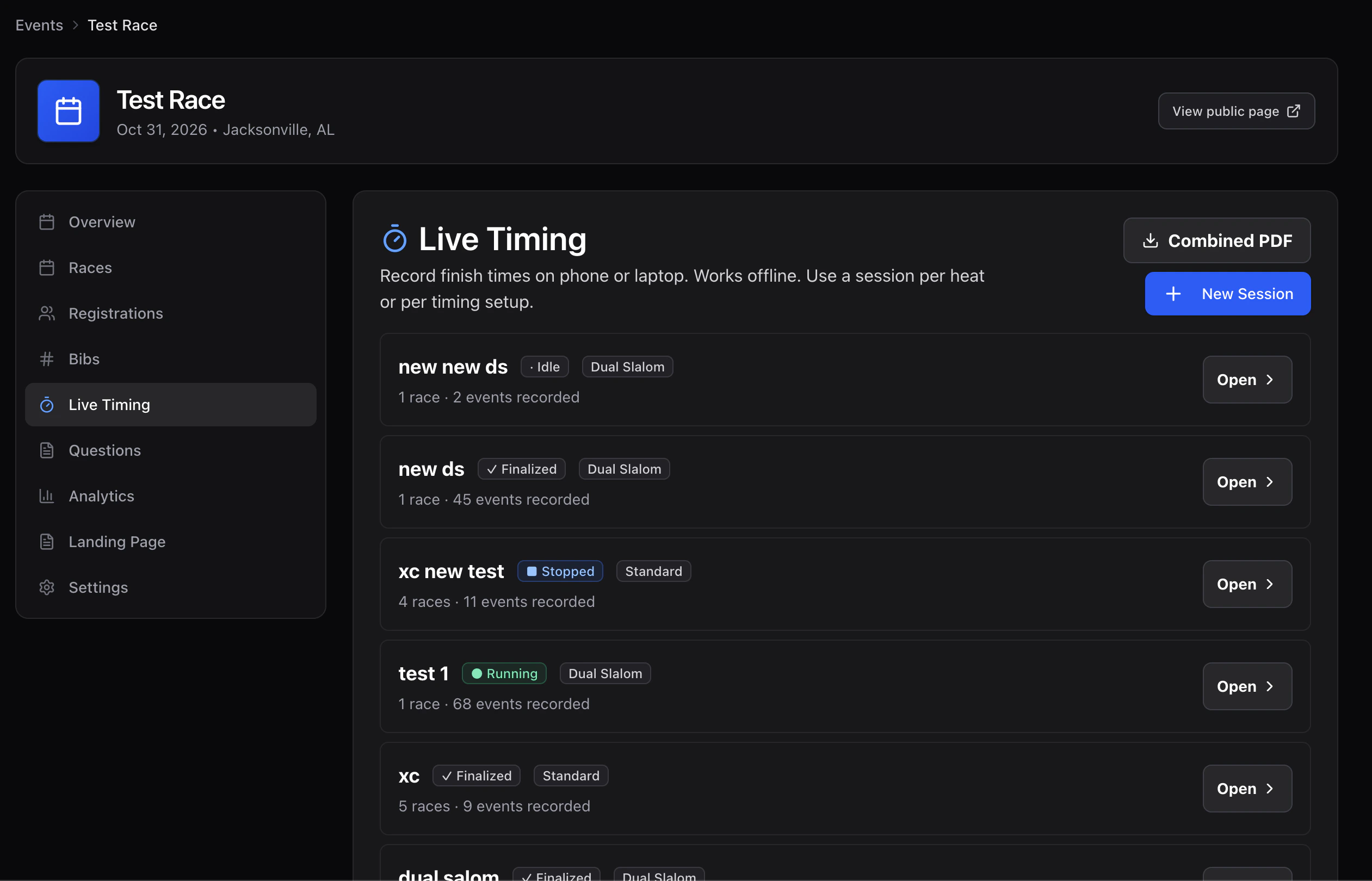
From the event's **Live Timing** tab, tap the session you're running. Volunteers with a session-scoped token land on that session directly.
 ## 3. Pick your role / race
Big buttons at the top:
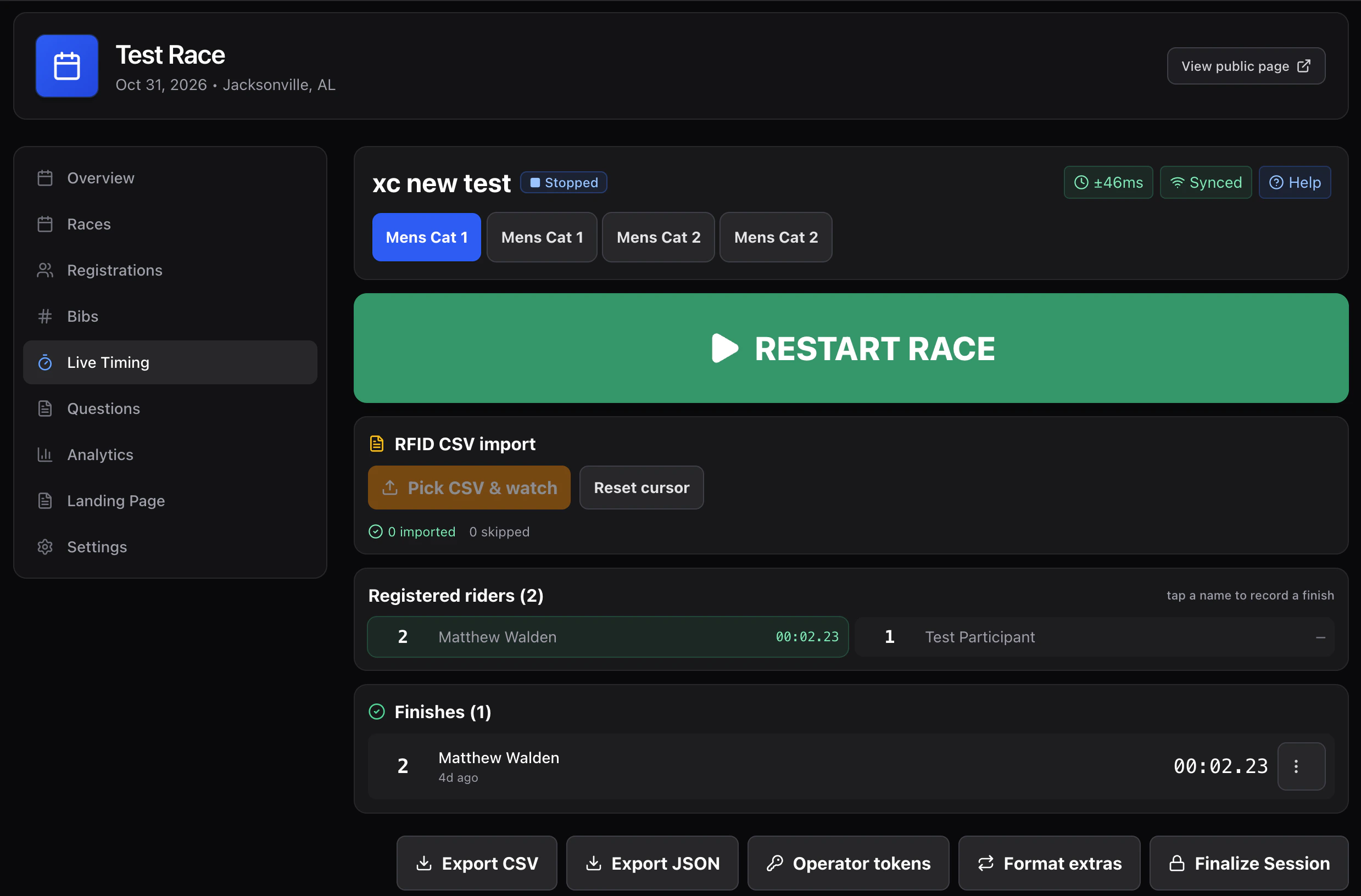
* **Race start / Pause / Resume / Stop** — controls the running clock for the active race. Anyone with `timer` can press these.
* **Race tabs** — switch which race is the recipient of plate input.
For a bracket, tap the trophy icon to see the current match.
## 4. Record finishes
### Plate entry (default)
1. Make sure the right race tab is selected.
2. Type the bib / plate number into the giant input.
3. Press **Enter** (or tap **Record**).
The clock keeps running; you can record as fast as you can type. Each finish is timestamped client-side and queued in IndexedDB.
### Tap a registered rider
The **Registered riders** panel under the input shows everyone signed up for the active race. Tap a name to record their finish at "now". Useful when bibs are unreadable.
### Two-lane (dual slalom)
Two side-by-side lane panels. Hit **Lane finish** when each rider crosses; the reducer pairs the two lanes into a match leg.
### RFID CSV import
In the RFID panel, click **Pick CSV & watch**. Each new line is ingested as a finish keyed by bib.
## 5. Working offline
The operator screen runs entirely from cache:
* A **service worker** keeps the page available without network.
* **IndexedDB** holds every finish you record.
* A **sync indicator** in the top bar shows 🟢 synced / 🟡 N queued / 🔴 OFFLINE.
When network returns, queued events drain in chronological order. You don't have to do anything.
> If you switch devices mid-race, finishes from the old device may not have uploaded yet. Reconnect the old device to Wi-Fi and let it drain before powering down.
## 6. Resync if something looks wrong
* **Pull-to-refresh** the operator page.
* The **clock chip** shows your offset from the server. Big offsets (over \~250 ms) reconcile automatically; if it looks frozen, refresh.
* If a finish is on the wrong rider, long-press / right-click → **Edit** or **Delete**. Deletes are soft — the audit log is preserved.
## 7. Finish & publish
When the race is over:
1. Tap **Stop** on each race in the session.
2. Review the finishes. Edit anomalies.
3. Tap **Finalize** — locks the session.
4. Tap **Publish** — surfaces results on the public page and enables the PDF download.
The **Combined PDF** button on the Live Timing list generates one document covering every published session for the event.
## 3. Pick your role / race
Big buttons at the top:
* **Race start / Pause / Resume / Stop** — controls the running clock for the active race. Anyone with `timer` can press these.
* **Race tabs** — switch which race is the recipient of plate input.
For a bracket, tap the trophy icon to see the current match.
## 4. Record finishes
### Plate entry (default)
1. Make sure the right race tab is selected.
2. Type the bib / plate number into the giant input.
3. Press **Enter** (or tap **Record**).
The clock keeps running; you can record as fast as you can type. Each finish is timestamped client-side and queued in IndexedDB.
### Tap a registered rider
The **Registered riders** panel under the input shows everyone signed up for the active race. Tap a name to record their finish at "now". Useful when bibs are unreadable.
### Two-lane (dual slalom)
Two side-by-side lane panels. Hit **Lane finish** when each rider crosses; the reducer pairs the two lanes into a match leg.
### RFID CSV import
In the RFID panel, click **Pick CSV & watch**. Each new line is ingested as a finish keyed by bib.
## 5. Working offline
The operator screen runs entirely from cache:
* A **service worker** keeps the page available without network.
* **IndexedDB** holds every finish you record.
* A **sync indicator** in the top bar shows 🟢 synced / 🟡 N queued / 🔴 OFFLINE.
When network returns, queued events drain in chronological order. You don't have to do anything.
> If you switch devices mid-race, finishes from the old device may not have uploaded yet. Reconnect the old device to Wi-Fi and let it drain before powering down.
## 6. Resync if something looks wrong
* **Pull-to-refresh** the operator page.
* The **clock chip** shows your offset from the server. Big offsets (over \~250 ms) reconcile automatically; if it looks frozen, refresh.
* If a finish is on the wrong rider, long-press / right-click → **Edit** or **Delete**. Deletes are soft — the audit log is preserved.
## 7. Finish & publish
When the race is over:
1. Tap **Stop** on each race in the session.
2. Review the finishes. Edit anomalies.
3. Tap **Finalize** — locks the session.
4. Tap **Publish** — surfaces results on the public page and enables the PDF download.
The **Combined PDF** button on the Live Timing list generates one document covering every published session for the event.
 ## Cheat sheet
| What | Where |
| ------------- | ---------------------------------------- |
| Active race | Race tab strip at top |
| Plate input | Giant input under tabs |
| Live finishes | "On course" list |
| Roster | "Registered riders" list — tap to finish |
| RFID watcher | "RFID CSV import" panel |
| Bracket match | Trophy icon → bracket panel |
| Sync status | Top-right pill |
| Resync | Pull-to-refresh |
| Finalize | Bottom of session screen |
| Publish | Bottom of session screen, after finalize |
| Combined PDF | Live Timing list page header |
If something's broken, screenshot and ping the race director. The full event log is server-side; nothing is lost even if your screen dies mid-race.
## Cheat sheet
| What | Where |
| ------------- | ---------------------------------------- |
| Active race | Race tab strip at top |
| Plate input | Giant input under tabs |
| Live finishes | "On course" list |
| Roster | "Registered riders" list — tap to finish |
| RFID watcher | "RFID CSV import" panel |
| Bracket match | Trophy icon → bracket panel |
| Sync status | Top-right pill |
| Resync | Pull-to-refresh |
| Finalize | Bottom of session screen |
| Publish | Bottom of session screen, after finalize |
| Combined PDF | Live Timing list page header |
If something's broken, screenshot and ping the race director. The full event log is server-side; nothing is lost even if your screen dies mid-race.