

The short version
Every time you press a button, Time2Bike records the exact moment you pressed it, not “how long since the race started”. Everything else — elapsed times, places, gaps — is worked out from those moments afterwards. That one decision is what makes the rest work.What it buys you
Four phones agree with each other
Four phones agree with each other
Each phone quietly checks itself against Time2Bike’s clock every few seconds
and corrects for the difference. So a finish recorded on the phone at the
line and a finish recorded on the phone at the feed zone are directly
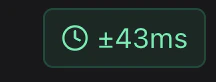
comparable, even if the two phones’ own clocks disagree.The screen shows how confident it is as a small
± milliseconds figure. On
a normal race-day connection this is small enough for head-to-head racing.Offline phones merge back in correctly
Offline phones merge back in correctly
A phone that spent an hour with no signal isn’t guessing when it reconnects.
Every finish it holds is stamped with a real moment, so it slots into the
right place in the results — not the end of the list.
Nothing gets counted twice
Nothing gets counted twice
Each entry carries its own identifier. If a phone with bad signal sends the
same finish three times while retrying, it still counts once.
Precision
Times are always stored down to the millisecond. What you display is your choice, under Timer setup → How I am timing:
Changing this later only changes what’s shown — the underlying times keep their
full precision, so you can tighten it up if two riders tie.
What to tell a rider who protests
Everything is recorded: what was entered, when, on which device, by whom, and every correction made afterwards. Nothing is overwritten and nothing is deleted outright — a correction is a new entry that supersedes the old one, and both remain. So you can always answer “what did the finish line actually record, and who changed it?” See History & corrections.If the clock indicator looks bad
The± milliseconds figure on the timing screen is how sure that phone is of
its own clock. If it’s showing several hundred milliseconds:
- It’ll usually tighten up on its own within a minute.
- Move to a spot with better signal if it doesn’t.
- Check the phone’s own clock is set to update automatically — a phone with the wrong date is the one thing that genuinely confuses it.
- Pull down to refresh the page.